
Free Flower of Life Grid Generator
Draw the Flower of Life from its true construction instantly with our 100% free grid generator. Lay all 19 circles over any canvas or reference, restyle every line, then export SVG or 600 DPI for stencils, print and laser cutting in seconds. No signup, no downloads needed. Trusted by 60,000+ artists worldwide.
Nineteen overlapping circles
Equal circles spaced one radius apart on a hexagonal lattice, each passing through the centres of six neighbours, bounded by two outer rings. The petal shapes between them are vesicas, not drawn separately but produced by the overlap.
3 controls, not a fixed picture
Set construction step and rings, toggle boundary circle. Every one is live on the canvas.
Stacks with sacred geometry & pattern
Overlays combine, each carrying its own transform, so this one can sit under or over sri yantra, metatron’s cube and seed of life, and 15 more in the same set.
Every intersection lands exactly
Because the circles are computed rather than traced, the crossings coincide at any scale. Export as SVG for machining or up to 600 DPI for print.
| Ctrl + Z | Undo |
| Ctrl + Y | Redo |
| Esc | Deselect overlay |
| Alt + drag | Free positioning (no snap) |
| Ctrl + scroll | Zoom canvas |
| Ctrl + P | |
| ? | Show this help |
Nineteen equal circles on a hexagonal lattice, each centred on another's circumference, inside the two rings that close the figure. Computed rather than traced, so the lattice stays true at any size. The Flower of Life is one of the 82 composition overlays in the app, and it stacks with the rest.
- 19 circles
- 1 radius
- SVG + 600 DPI export
- Nothing uploaded
What is the Flower of Life?
The Flower of Life generator is a free browser tool that draws the figure on a blank canvas or over any reference image you load. The figure is nineteen equal overlapping circles arranged on a hexagonal lattice, each centred on the circumference of its neighbours, enclosed by two concentric rings. Because every circle is computed from one radius rather than traced from a picture, the lattice stays exact at any size, which is what makes the output usable for a stencil, a laser file or a print. It is part of Grid Maker Pro, so the figure can be stacked with the Seed, Egg and Fruit of Life, or with Metatron's Cube, and exported as SVG or at up to 600 DPI.

How to make a Flower of Life
Overlapping circles on a single radius, ring by ring, until the figure is as wide as the work needs. Export it as vector and it stays exact at any size.
Open the Flower of Life overlay
Open the tool with the Flower of Life already selected. All nineteen circles and the two enclosing rings are generated from a single radius, so the lattice is correct before you change anything.
JPG · PNG · GIF · WEBP
Size it to your surface
Work on the blank canvas, or drop in a reference photograph and scale, rotate and drag the figure over it. The overlay carries its own transform, so whatever is underneath stays where it is.
Construction step · Rings · Boundary circle
Style it, then export
Set line colour, width and opacity for the surface you are making, then export SVG for a cutter or laser, or a raster at up to 600 DPI sized to your paper.
PNG · JPG · PDF · SVG · up to 600 DPI
Three steps, about a minute. No signup, no upload.
What the Flower of Life Generator does
One radius, nineteen circles
The Flower of Life is generated from one radius, every circle centred on a neighbour's circumference, so the lattice never drifts the way a hand-copied or rescaled figure does.
Over your own reference
Load a photograph, a panel scan or a wall shot and place the figure on top of it with its own independent transform.
Every line under your control
Colour, width and opacity are set per overlay, and the eyedropper samples any pixel underneath so the figure can sit into the artwork rather than on top of it.
Stacks with its own family
Run the Flower with the Seed, the Egg, the Fruit or Metatron's Cube at once; each keeps its own position, scale, rotation and styling.
Vector out, not just pixels
SVG export gives real circles for a laser cutter, a plotter or a vinyl workflow. Raster export runs to 600 DPI, sized to paper from A5 to A2.
Nothing is uploaded
The geometry is drawn in your browser and any reference you load is read locally. There is no signup and no server that could receive the image.
Flower of Life examples: four ways the figure gets used
Flower of Life vs standalone sacred-geometry generators vs downloaded template images
| Option | Computed geometry | Over your own image | Vector export | Cost |
|---|---|---|---|---|
| Grid Maker Prothis tool | Yesregenerated at canvas size | Yeswith independent transform | SVG + raster to 600 DPI | Free |
| Standalone sacred-geometry generators | Yes | Norenders on its own ground | Varies by tool | Free or paid |
| Downloaded template images | Nofixed resolution | Only in a separate editor | Rarely | Free or paid |
| Compass and straightedge | Only as well as the hand executes it | On the surface itself | No | Time |
Who the Flower of Life is for: the people who need the lattice to close
How the Flower of Life works — Why the figure is one circle repeated, and why that matters when you scale it
The Flower of Life looks like an intricate pattern and is actually an extremely simple rule applied nineteen times. Understanding which it is decides whether your enlargement holds together.
The construction has one parameter: a radius. Draw a circle, then draw six more of the same radius with their centres spaced around its circumference, and the seven-circle figure known as the Seed of Life appears. Keep going by the same rule — every new centre sits on an existing circumference — and the lattice grows outward through the thirteen-circle Fruit of Life to the nineteen complete circles that make the Flower, which is then closed inside two concentric rings. Extended further, the same rule produces the ninety-one-circle figure.
Because there is only one parameter, there is only one way to be wrong: a circle whose centre is not exactly on its neighbour's circumference. That single error is invisible at thumbnail size and structural at wall size. It is also self-propagating — each subsequent circle is placed relative to the last, so a small offset near the middle opens into a visible misalignment at the rim, and the six-fold symmetry that gives the figure its character stops closing.
The Flower of Life is not a drawing to be copied. It is a rule to be executed, and a copy is a record of how well somebody else executed it.
This is why sourcing the figure as an image is the wrong move for production work. A downloaded PNG is somebody's execution of the rule at one fixed resolution, complete with whatever drift it already had, and enlarging it for a canvas, a mural or a laser bed magnifies that drift alongside the artwork. Redrawing it by compass is the traditional answer and a genuinely worthwhile discipline — but it is also where the propagating-error problem bites hardest, because a compass point that lands a millimetre off is a millimetre you cannot recover later.
A computed overlay sidesteps both. The figure is regenerated from its radius every time it is drawn, at whatever size the canvas happens to be, so there is no fixed-resolution original to degrade from and no accumulated hand error to inherit. Exporting SVG makes that permanent: the output is a set of true circles a cutter or plotter can scale without loss, which is what laser and vinyl workflows actually need. Raster export at 600 DPI covers the print case, sized to the paper rather than to the screen.
What the history does and does not support
The figure has a genuinely long visual history, and it also attracts claims that outrun their evidence. The markings at the Osirion in Abydos are real, but their date is disputed and many scholars read them as much later additions rather than contemporaneous with the structure. Leonardo da Vinci did draw the construction and several of its derivations in his notebooks. Treating the first as settled and the second as decorative gets both backwards; the Flower of Life reference page sets out what is documented, with sources.
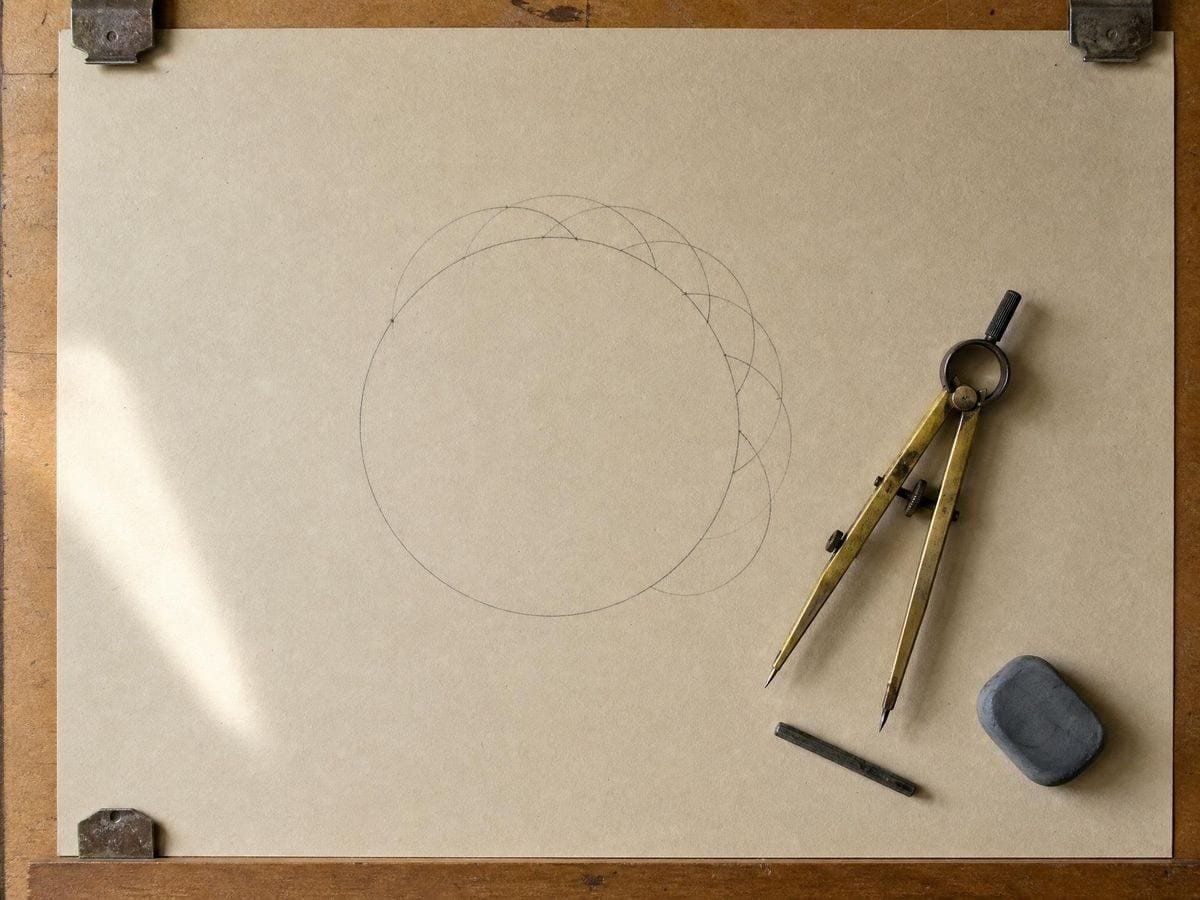
Why exactly six circles fit around one
The six-fold symmetry is not a stylistic choice, it is forced. Take a circle of radius r and place a second of the same radius with its centre on the first's circumference: the distance between centres is r. Do it again around the ring and each pair of adjacent centres is also r apart, so every centre-to-centre triangle has three sides of length r — an equilateral triangle, whose angles are 60 degrees. Six of those fill exactly 360 degrees, which is why six circles close the ring perfectly with no gap and no overlap, and why the seventh circle is the one in the middle.
That is also the reason the figure is so unforgiving. The equilateral relationship is exact, so any deviation is a deviation from something with no tolerance built into it. A pattern based on squares can absorb a small error because a square lattice is over-determined in a forgiving way; a hexagonal packing of equal circles has one correct answer and every other answer is visibly wrong once the ring comes back around to where it started.
Tiling beyond the export size
Work larger than A2 needs a decision about how you get there. SVG export is the clean answer where the destination accepts vector: a laser bed, a plotter, a vinyl cutter or a print shop that can rasterise at their end. Where you are stuck with paper, tile the raster and register the sheets on the outer of the two enclosing rings rather than on the circle edges inside — the ring is a single continuous curve, so a misregistration shows up immediately as a step in it, whereas the inner lattice is forgiving enough to hide a few millimetres of drift until it accumulates. Registering on the least forgiving element is the fastest way to find the error while you can still fix it.
Choosing line weight for the surface
Line weight decides whether an exported Flower is usable, and it is surface-dependent. The figure's density is uniform — unlike a yantra there is no crowded centre — but the lens shapes where circles overlap are small, and a heavy line closes them into solid blobs, which reads as a smudge rather than a lattice. For a laser or vinyl cut the line is a path, so weight is a preview concern rather than an output one; size the figure to the bed and export SVG. For a print, 600 DPI on A4 holds the lens shapes cleanly. For an overlay on a photograph, drop opacity before you thin the line: at low opacity a slightly heavier line still reads as structure, whereas a hairline at full strength reads as a scratch.
Where the Flower of Life gets used
Laser files are unforgiving. A traced flower had circles that were nearly concentric and the cut showed every one of them. Generating it and exporting SVG removed the problem entirely.
I use it as an underlay for mandala painting. Being able to drop the opacity and sample a colour out of the panel means the guide disappears into the work instead of fighting it.
For teaching, watching the same radius produce the whole figure lands better than showing a finished one. Students see it is a rule, not a picture.
Flower of Life: frequently asked questions
The geometry
Is the geometry exact, or just an illustration?
Every circle is generated from one radius with its centre on a neighbour's circumference, so the lattice resolves identically at any size. That is the property a traced or rescaled image cannot keep.
Can I put it over my own photograph?
Yes. Load any image and the figure draws on top of it with an independent transform, so you can align its centre to a feature in the photograph without moving the image.
Is the Flower of Life at the Osirion really ancient?
The markings at Abydos are real, but their date is disputed and many scholars regard them as considerably later than the structure itself. The Flower of Life reference page covers what the evidence supports and what it does not.
Can I use this for a tattoo stencil?
It is a common use. Set the line weight for the stencil, export SVG or a 600 DPI raster at the size you will print, and the circle centres stay true at scale. The tattoo artists page has more on that workflow.
Where can I learn to construct it by hand?
The Flower of Life reference page covers the compass construction, the figure's family and the history, with sources. This page is for producing it; that one is for understanding it.
Using it
How many circles are in the Flower of Life?
Nineteen complete circles of equal radius, enclosed by two concentric rings in the standard figure. Counts of 7 and 13 refer to the Seed of Life generator and the Fruit of Life generator, which draw earlier stages of the same construction, and 91 refers to the extended figure.
What does the rings control change?
How far the lattice extends from the centre. The classic nineteen-circle figure is two rings around one; raising the count keeps adding hexagonal rings outward, which is closer to how the figure appears carved on a wall — as a field rather than as a bounded motif.
Should I keep the boundary circle on?
For the traditional motif, yes — the two enclosing circles are part of how the figure is nearly always drawn, and without them the lattice has no edge. Turn them off when you are using it as a construction field rather than as a symbol.
Export and print
Can I export the Flower of Life as an SVG?
Yes. SVG export gives true circles as vector paths, which is what a laser cutter, plotter or vinyl workflow needs. Raster export runs to 600 DPI if you would rather print it — see all features for the full export list.
What size can I print it at?
Export is sized to the paper format you choose, from A5 to A2, at up to 600 DPI. For anything larger — a mural cartoon, for instance — export SVG and scale it without loss, or tile the print.
Can I cut it on a laser or vinyl cutter?
Yes, with one thing to check first. Nineteen overlapping circles produce a great many small enclosed regions, and a cutter will separate every one of them — decide whether you want the circles cut as outlines or the regions cut as pieces, because the two files look identical on screen.
Choosing a grid
What is the difference between the Seed, the Flower and the Fruit of Life?
They are stages of one construction: the Seed is seven circles, the Flower is nineteen, and the Fruit is the thirteen-circle figure whose centres generate Metatron's Cube. All are in this app and they stack, so you can see one produce the next.
Is a downloaded template not good enough?
Most are close and not exact. The figure depends on each circle being centred exactly on its neighbour's circumference, and a template redrawn by eye or traced from a photograph drifts — which shows as circles that nearly, but not quite, pass through the right points once you scale it up.
Practical matters
Do I need an account, and does my image get uploaded?
Neither. There is no signup and no upload step: the geometry is drawn in your browser and any reference you load is read locally. There is no server to send it to.
Is it suitable for a tattoo stencil?
It is one of the better candidates, because the geometry is exact and scales cleanly. Take the SVG rather than a raster — a stencil is enlarged, and nineteen circles with soft edges will not register when they are transferred.
Can I use it commercially?
Yes. The figure is ancient and unowned, exports carry no watermark, and the terms leave whatever you make with you.
Open the tool Flower of Life generator
Nineteen circles, one radius
The Flower of Life draws on a blank canvas or over your own reference, styled to the surface, and goes out as vector or 600 DPI. No signup, nothing uploaded.
Back to the generator →