
Skip to content →
Grid Maker Pro app features

Every feature in the AR drawing app.

The free web tool gives you 82 composition grids in the browser. The app adds AR tracing — it locks a reference photo over your real paper or canvas through the camera so you can draw the proportions by hand. This is the full tour of what it does, feature by feature.

82 pro grids no tracing app has Your photo, free every month On-device, no account to start
AR trace studio Reference glued to the canvas — adjust opacity and trace. IDLE ClassicProjectorBreakdown OpacityScaleRotate ImageGridsFreezeLock GrayscaleMirrorDimAuto Record overlaySplit
The Grid Maker Pro app is an augmented-reality drawing app. Its features come down to a short, honest list: lock a reference photo over your real surface with the camera, draw over any of the 82 composition overlays, control opacity and scale, keep the reference anchored as you move, record a time-lapse, and do all of it on the device without an account. This page walks through each one.
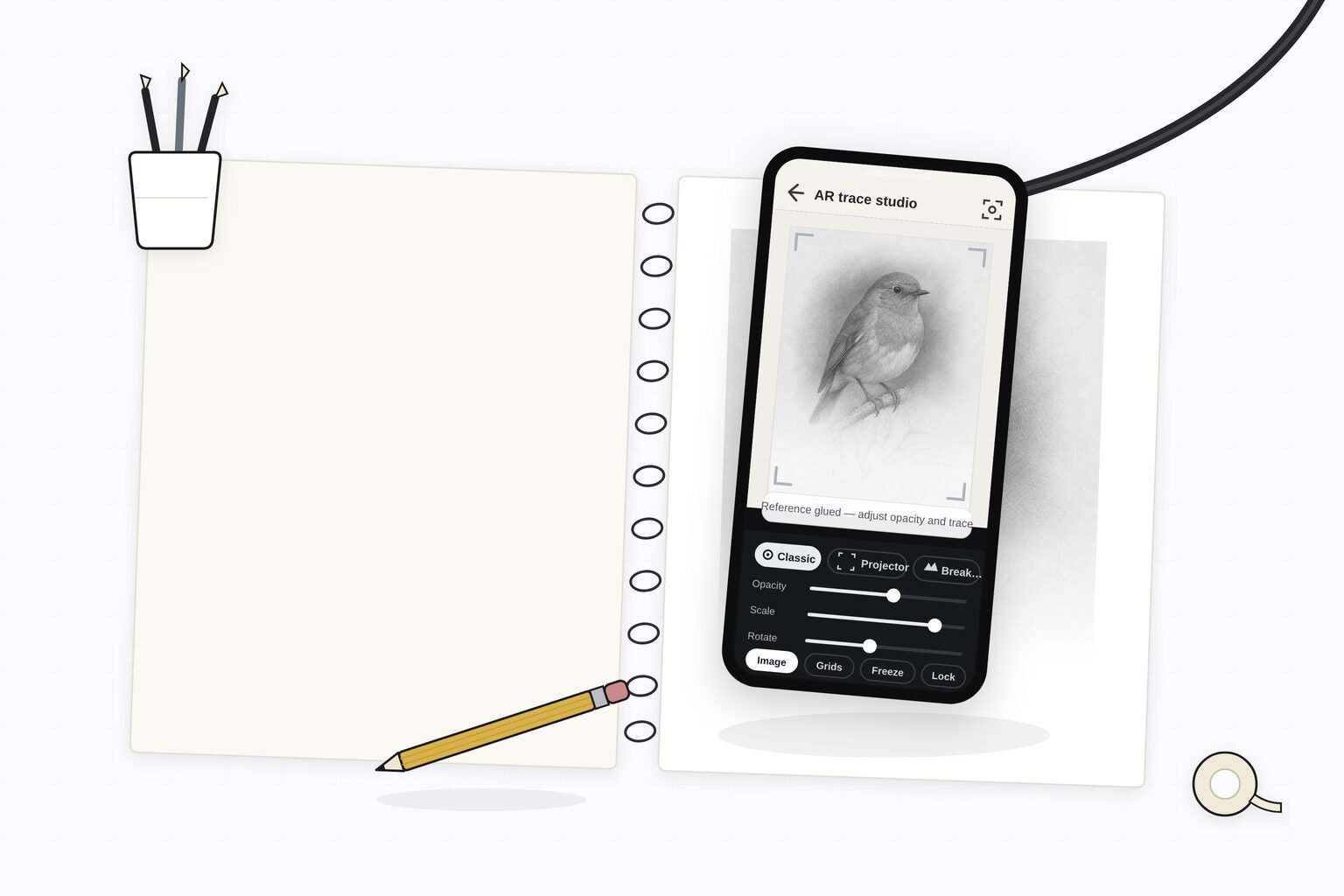
Illustration: a phone held above a sketchbook on a gooseneck arm, the AR trace studio showing a bird reference locked over the drawing in progress
Every feature serves one moment: the reference holding steady over the page. Photos on this page are illustrations, not app screenshots.

The feature tour

Six things the app does. Nothing here is a browser trick — it is the part of drawing that only a camera pointed at real paper can help with.

The core

AR tracing onto real paper, canvas, or a wall

This is the feature the whole app is built around. Aim the phone at your paper, canvas, or wall, and your reference appears as a translucent layer floating over the real surface in the camera view. You draw the proportions straight onto the paper by hand — no projector, no light box, no copying a grid square at a time. It is the one thing the free browser tool physically can't do, which is exactly why the app exists.

If you want the background on the older analog methods and where AR fits among them, the guide on how to trace a photo onto paper covers it.

AR trace studio Locked to the paper — trace at your own pace. IDLE ClassicProjectorBreakdown OpacityScaleRotate ImageGridsFreezeLock GrayscaleMirrorDimAuto Record overlaySplitthe reference locked over real paper
Your reference

Trace your own photo, free every month

Pick any photo from your camera roll and trace it. The free tier includes three AR traces of your own photo every month, so you can feel the result on a reference that matters to you before you decide to pay for anything. Plenty of tracing apps lock importing your own image behind the paywall on the very first open — this app does the opposite.

The full breakdown of what the free tier covers versus the paid plans lives on the pricing page.

YOUR CAMERA ROLL AR trace studio Your photo, brought in — scale it and lock it down. IDLE ClassicProjectorBreakdown OpacityScaleRotate ImageGridsFreezeLock GrayscaleMirrorDimAuto Record overlaySplityour own photo, free every month
The library

All 82 composition and drawing overlays

The app carries the complete Grid Maker Pro overlay library — golden ratio, Loomis head, dynamic symmetry, perspective, sacred geometry, and the rest of the eleven categories. No other tracing app ships a composition set this deep. You can draw over a grid on its own, or lay a grid on top of your own reference photo and use both together.

The same 82 overlays run free in the web tool; browse them by type in the grid library.

AR trace studio Overlay live on the reference, not the paper. IDLE ClassicProjectorBreakdown OpacityScaleRotate ImageGridsFreezeLock GrayscaleMirrorDimAuto Record overlaySplit82 OVERLAYSgrids ride along with the reference
The controls

Opacity, scale, and rotation you set by hand

Fade the reference down so you can see both the image and your own pencil marks at once, then push it back up to check your outline. Scale it to fit a small sketchbook page or a large canvas, and rotate it to match the angle you are drawing at. These are the adjustments that turn "a photo held over paper" into something you can actually work against for an hour.

25%55%90%OpacityScaleRotate AR trace studio Fade it back to check your own marks. IDLE ClassicProjectorBreakdown OpacityScaleRotate ImageGridsFreezeLock GrayscaleMirrorDimAuto Record overlaySplitfade it back to check your own marks
The tracking

Lock-in-place tracking that holds when you move

Tap once to anchor the reference. From then on it stays pinned to your real surface using the device camera and motion sensors, so it keeps its position and scale when you shift the phone, lean in for detail, or set it down and pick it back up. This lock-in-place tracking is the difference between AR tracing and just holding a photo steady — it is what makes the proportions stay true across a whole drawing session. No headset and no external hardware are involved.

MOVE THE PHONE — IT STAYS PUT AR trace studio Anchored — move freely, the reference stays put. IDLE ClassicProjectorBreakdown OpacityScaleRotate ImageGridsFreezeLock GrayscaleMirrorDimAuto Record overlaySplit AR trace studio Anchored — move freely, the reference stays put. IDLE ClassicProjectorBreakdown OpacityScaleRotate ImageGridsFreezeLock GrayscaleMirrorDimAuto Record overlaySplitanchored to the surface, not the screen
The record

Time-lapse recording of the whole session

Record the drawing as it comes together and the app produces a time-lapse of the full session, ready to post to Reels, Shorts, or TikTok. It is the natural way to show process work without setting up a separate camera rig, and it turns every trace into something you can share.

recordingthe whole session, ready to post
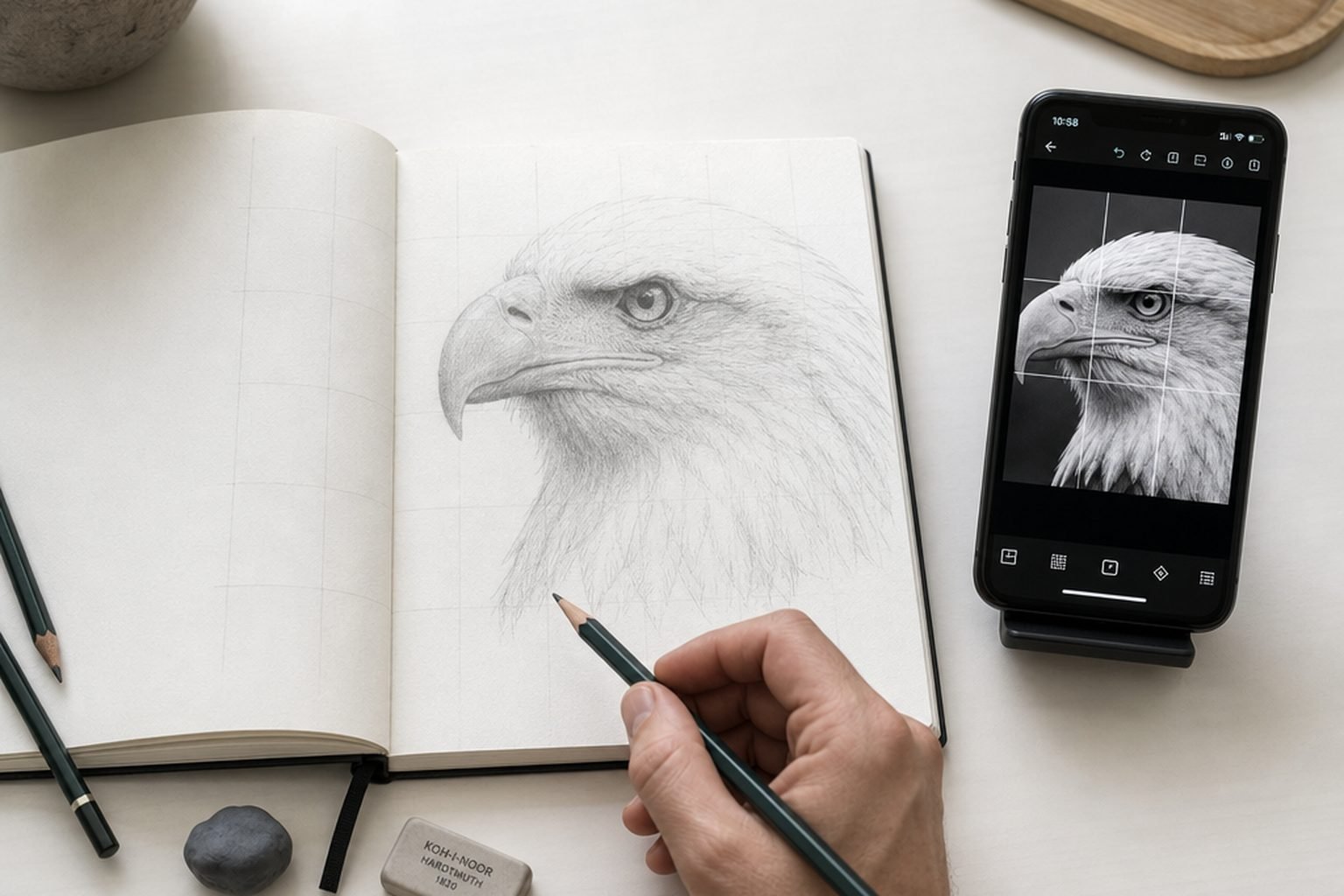
Illustration: a sketchbook page with a composition grid drawn over a portrait study, beside a phone showing the same grid overlay in the app
The 82 overlays ride along in the app — grids as well as photo references.

The features at a glance

Every capability, and which tier it belongs to. The web tool stays free forever; the app adds AR tracing on top.

Feature What it does Free tier Paid plans
AR tracing Locks a reference over real paper, canvas, or a wall through the camera 3 traces / month Unlimited
Your own photo Import and trace a photo from your camera roll Included Unlimited import
82 composition grids The full Grid Maker Pro overlay library, draw over any of them All 82 All 82 + future overlays
Opacity, scale, rotation Set the reference exactly against your surface and your marks Included Included
Lock-in-place tracking Anchors the reference so proportions hold as you move the phone Included Included
Time-lapse recording Captures the whole session as a shareable clip Paid Included
On-device processing Your reference photo stays on your phone; no account to start Included Included

Free covers three AR traces of your own photo each month plus all 82 grids. Unlimited tracing is $29.99 a year, $6.99 a month, or $79 once for Lifetime — see the pricing page for the detail and auto-renew terms.

Why this feature set, and not a longer one

The list is deliberately short. Every feature earns its place at the easel — nothing is here to pad a store listing.

Built by a real artist

Fifteen years at the easel decided this list. Each feature is one Sujith Puthran wanted while drawing, not a checkbox a software studio guessed at.

Private by design

Reference photos are processed on the device for the overlay, and no account is required to start drawing. There is nothing to sync and nowhere to upload.

Android first, iOS planned

The app launches on Android through Google Play first; an iOS build is planned. Until then the free web tool runs the 82 grids in Safari on iPhone and iPad.

Feature questions, answered plainly

What are the main features of the AR drawing app?

The app locks a reference photo over your real paper or canvas through the camera so you can draw the proportions by hand, carries all 82 composition overlays, lets you adjust opacity, scale and rotation, holds the reference in place as you move the phone, records a time-lapse of the session, and processes your photo on the device. You can start with no account.

Can I trace my own photo, or only built-in images?

Both. You can trace a photo straight from your camera roll — the free tier includes three AR traces of your own photo every month — or draw over any of the 82 built-in overlays. Tracing your own reference is the feature many apps lock behind the paywall on the first open; here it's part of the free tier. See the pricing page.

Does the reference stay in place while I draw?

Yes. Once you tap to lock the reference, it anchors to your real surface using the device camera and motion sensors, so it holds its position and scale when you shift the phone or lean in. That lock-in-place tracking is what makes AR tracing usable rather than a photo you have to hold perfectly still.

Do the 82 grids from the web tool work in the app?

Yes. The app ships all 82 composition and drawing overlays from the free Grid Maker Pro web tool — golden ratio, Loomis head, dynamic symmetry, perspective, sacred geometry and the rest. You can draw over a grid alone, or over a grid combined with your own reference photo.

Is my reference photo uploaded anywhere?

Your reference photos are processed on your device to build the overlay, and no account is required to start. The app privacy policy sets out exactly what is and isn't collected.

Grid Maker Pro the AR app

See the features on your own photo.

Free includes three AR traces of your own photo every month. No account to start.

COMING SOON TO Google Play