
Free Art Projector Tool
Turn your phone into an art projector instantly with our 100% free tool. Float any reference over the live camera view, lock it in place, and trace directly onto real paper in seconds, with no hardware and the camera never recorded. No signup, no downloads needed. Trusted by 60,000+ artists worldwide.
Camera
Align
Fixed to the frame, not to the picture — landmarks to line the reference back up against if the phone gets knocked.
Reference
Freezes position, size and rotation, so a stray finger cannot move it.
The camera stands in for the projector
The rear camera shows your actual paper, and the reference floats over that live view at whatever opacity lets you see both. Scale, rotation, position and a mirror put it on the paper, two fingers do the same thing directly, and a lock freezes the alignment so a stray finger cannot move it while you draw. A guide grid sits on the frame rather than on the picture, so there are fixed landmarks to line the reference back up against if the phone gets knocked.
9 controls, not a fixed result
Set opacity, size, rotation and line weight, choose camera, guide grid and reference style, toggle mirror and lock the alignment. Every change redraws over the live view, in this page's own document.
Part of the draw & transfer set
The set also holds grid drawing tool, image splitter and proportion calculator, and 10 more in the group, all of them free and all of them working in the browser.
The drawing is the output
There is no file at the end, and no export — the work happens on the paper in front of you. Nothing reaches a server either: the video and the reference are separate layers on your own screen, and neither is recorded.
- 100% free
- No signup
- No watermark
- Nothing is uploaded
Point the phone at your paper, float the reference over the live view, and draw what you see through the screen. It replaces an opaque projector and a darkened room with a device you already own.
The art projector draws one of the 82 composition overlays in Grid Maker Pro, and the rest stack on the same image.
- Rear camera
- Lock while you draw
- Mirror + line art
- Never recorded
What is an art projector?
An art projector throws a reference image onto a surface for drawing round. This one uses the phone's rear camera instead of a lamp: the live view of your paper is shown on screen with the reference floating over it at an adjustable opacity, scaled, rotated and positioned to fit the sheet, then locked so it cannot drift while you work. No projector, no darkened room, and the camera stream is displayed without ever being recorded or uploaded.

How to trace a picture using a phone as an art projector
The reference on your screen, scaled and squared to the paper on your easel, so the projection lands where you want it without moving the projector twice.
Mount the phone above the paper
The art projector needs the device held still, and that single thing decides whether it works at all. A cheap desk arm, a stack of books, or a tripod with a phone clamp all do it. Hand-holding is possible for quick shapes but the reference shifts every time you look away.
JPG · PNG · GIF · WEBP
Start the camera and float the reference
Grant camera access and the rear camera opens on your paper. Drop in the picture, then drag, scale and rotate it — or pinch and twist it with two fingers — until its edges sit where you want the drawing on the sheet. Drop the opacity until you can see both the reference and your pencil.
Columns · Rows · Source width
Lock it, then draw
Locking freezes the position, scale and rotation so a stray finger on the screen cannot move the reference after it is aligned. Then draw on the paper while watching the screen — the pencil and the reference appear in the same view.
PNG · JPG · PDF · SVG · up to 600 DPI
Three steps, about a minute. No signup, no upload.
What the Art Projector does
The rear camera, deliberately
Browsers default to the front-facing camera, which points at your face and is useless here. This asks for the environment-facing camera, so the view is of the paper the moment it opens.
Lock is the control people ask for
Aligning the reference takes a minute; knocking it out of alignment takes a moment. The lock disables dragging, scaling and rotation so the reference stays exactly where you put it for as long as you are drawing.
Opacity is the working control
Too opaque and you cannot see your own line; too faint and there is nothing to follow. Somewhere near forty per cent usually lets the pencil and the reference coexist, and it changes with paper and lighting.
Mirror, for transfer and lettering
Flipping the reference matters in two real cases: transferring a drawing face-down onto another surface, and laying out lettering that will be seen from the other side of a window or a screen-print.
Contrast mode, not a filter
High-contrast strips the reference to greyscale and pushes the tones apart, so what remains are the boundaries you are actually going to draw. A third setting goes further and reduces the picture to its outlines alone, which is the fastest thing to follow through a screen. A full-colour photograph is much harder to follow than its shapes are.
Displayed, never recorded
The camera stream is attached straight to a video element. It is not drawn into a canvas, not buffered and not sent anywhere, and the tracks are released when you leave the page or stop the camera.
Art projector examples: four ways an image gets onto a surface
Art projector vs opaque projector vs grid method
| Option | Needs hardware | Works in daylight | Survives movement | Scales up well |
|---|---|---|---|---|
| Phone as art projector | A phone and a mount | Yes | Norealignment needed | Limited by the source resolution |
| Opaque projector | A projector and a dark room | No | Yesonce set up | Yesto wall size |
| Grid method | Nothing | Yes | Yes | Yesat any size |
| Light box | A light box | Yes | Yes | Nosame size only |
Who an art projector is for: people drawing on real paper
How an art projector works — Optical aids, tracing, and what a phone actually replaces
An art projector is the newest member of a family four centuries old: artists have used optical devices to get an accurate image onto a surface since the camera obscura. It is the one of the 82 composition overlays and tools here that uses a camera rather than a grid. The phone version is new; the practice is not, and knowing which device this replaces explains both what it is good at and where it will let you down.
The instruments this descends from
The camera obscura is the oldest of them: a darkened room or box with a small aperture that projects an inverted image of the outside world onto the opposite wall. It was described in antiquity, refined with lenses in the sixteenth century, and used as a drawing aid well into the nineteenth.
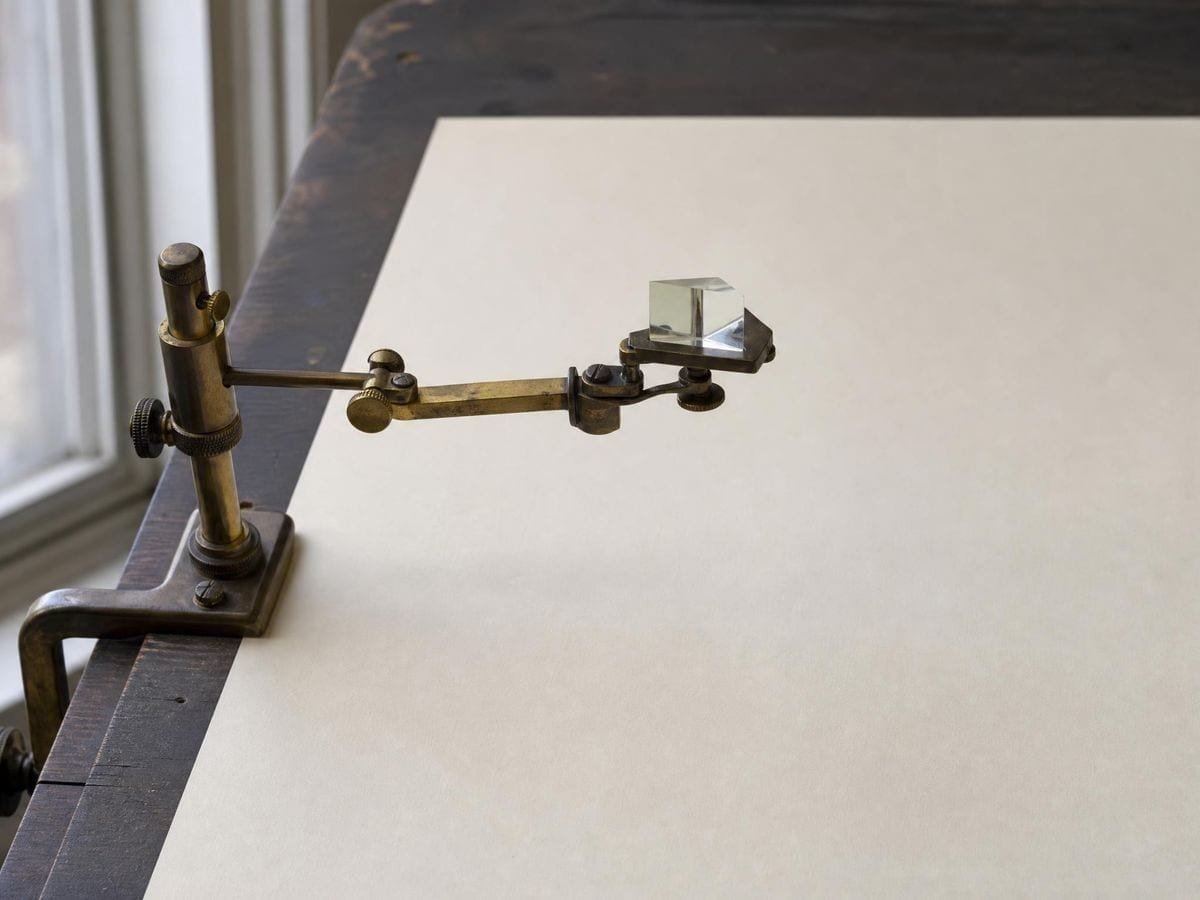
The camera lucida, patented by William Hyde Wollaston in 1806, is subtler. A prism placed above the paper superimposes a virtual image of the subject onto the drawing surface, visible only from one eye position. Nothing is projected; the image exists only in the artist's eye, which is precisely the arrangement a phone camera reproduces.
The opaque projector, which the term "art projector" usually means today, is a twentieth-century lamp-and-lens device that throws an enlarged image of a flat original onto a wall or canvas. It is the tool muralists have used for decades, and it has two persistent problems: it needs the room dark, and it is a large object to own.
What the phone actually does
This tool is closer to the camera lucida than the projector. Nothing is thrown onto the paper — the paper is lit normally, and the superimposition happens on a screen between your eye and the sheet. That is why it works in daylight, where an opaque projector does not.
The consequence is that you draw while looking at the screen rather than at your hand. This is genuinely awkward for the first few minutes and then stops being noticeable, in much the same way that using a graphics tablet does. The camera lucida required the same adjustment and artists managed it for two centuries.
Alignment, parallax and why the mount matters
The reference is a flat overlay on a camera view; it does not know where your paper is in space. If the phone is directly above the sheet and parallel to it, the overlay maps cleanly onto the paper. If the phone is at an angle, the camera sees a trapezoid and the overlay does not, so a rectangle traced from the screen comes out skewed on the paper.
Getting the device roughly parallel and centred is therefore worth more than any control in the interface. A desk arm that holds the phone flat above the paper solves most of it. Where a slight angle is unavoidable, keeping the subject near the centre of the frame limits the error, because the distortion grows toward the edges.
Parallax is the second effect. Move your head and the relationship between the on-screen overlay and the physical paper shifts slightly, because you are looking through a screen at a scene behind it. Working from a roughly fixed viewing position keeps this from accumulating.
Is tracing cheating?
This question arrives with every tool of this kind, and it deserves a straight answer rather than a defensive one. Tracing is a technique for getting an accurate outline onto a surface quickly. It is not a technique for learning to see, and it does not teach proportion, structure or edge quality.
Professionally it is routine. Muralists project. Animators use light boxes. Illustrators transfer. Sign painters pounce. In none of those trades is accurate transfer confused with the skill of the work, because the skill is in everything that happens after the outline exists.
The historical argument is more contested. David Hockney's Secret Knowledge (2001) proposed that many Old Masters used optical aids from the fifteenth century onward, and the claim remains disputed among art historians. What is not disputed is that the devices existed, were sold to artists, and were described in artists' manuals.
The honest position for a learner is that tracing and drawing from observation build different things. If the goal is a finished piece with a correct armature, tracing is a legitimate step. Where the goal is to learn proportion, the drawing grid maker and the proportion calculator make you measure instead, and the artist guide overlays set out that route — the basic drawing grids being where it starts. If the goal is to be able to draw without it, the grid method — which forces you to compare and measure rather than follow — teaches more.
Where a camera projector beats a grid, and where it does not
The camera beats a grid on speed and on complex organic contour, for any subject where the value is in the exact outline. A tangle of foliage, a crowd, a piece of machinery with dozens of edges — anything where the value is in the exact contour rather than in the proportion — comes across far faster than it would square by square.
The grid wins on large surfaces, on accuracy under movement, and on anything you cannot get a device above. A wall is the obvious case: no phone mount spans a mural, and the moment you move the device the alignment is gone, whereas a grid drawn on the wall stays where it is drawn.
The grid also wins whenever the reference has to be enlarged a great deal. Scaling a small photograph up on screen does not add detail, and at high magnification you are tracing a blur. Proportional transfer by cells stays as sharp as the original however far it is scaled.
Practical settings that tend to work
Two settings decide this: bright, even light on the paper, and no strong lamp in the frame. The camera exposes for the whole scene, and a bright window behind the sheet will make the paper dark on screen.
Opacity around forty per cent, adjusted until the pencil line is clearly distinguishable from the reference. Turn contrast mode on for photographs and off for line art, which is already high-contrast.
Lock the reference as soon as the alignment is right, and check the alignment again after any pause — a bumped phone is the commonest way a traced drawing goes wrong, and it is easy to miss until the drawing no longer fits the sheet.
Where an art projector gets used
Sketchbook work from photographs, where the point is a fast accurate armature and the drawing proper happens afterwards. This is the commonest use and the one the phone suits best.
Lettering and signage layouts, where mirror mode matters because the work is often executed on the reverse of a surface or transferred face-down.
Teaching, where a phone on a desk arm gives a whole table a demonstration of how an outline relates to a reference without a projector or a darkened room.
Art projector: frequently asked questions
The geometry
What is an art projector?
An art projector puts a reference image onto a drawing surface for tracing. Traditionally it was a lamp-and-lens device that threw the picture onto a wall; this version superimposes the reference on the live camera view of your paper instead, so no light is projected and the room does not need to be dark.
Why does it open the wrong camera?
The page requests the environment-facing camera on the first open, and a device with an unusual camera arrangement resolves that request differently. Pick the right one from the Camera list, or tap the flip button, and it switches straight over. On a modern phone that list is also how you reach the ultra-wide lens, which gets more paper into the frame.
Why does my traced drawing come out skewed?
The phone is at an angle to the paper. The camera sees the sheet as a trapezoid while the overlay stays rectangular, so the mapping is no longer one to one. Getting the device parallel to the sheet and roughly centred over it removes most of the error.
What is mirror mode for?
Two things. Transferring a drawing face-down onto another surface, where the image has to be reversed to come out the right way round; and lettering that will be read from the other side, as in window signage and screen printing.
Can I use it for a mural?
For studies and small panels, yes. For a wall, no — no phone mount spans a mural, and any movement of the device loses the alignment. Scaling a drawing onto a wall is what the mural scaling calculator and a drawn grid are for.
Does it work on a laptop?
It runs, but a laptop camera points forward rather than down, which makes it awkward to aim at paper on the desk, and the page says so on screen as soon as it knows which way the camera faces. The tool is built for a phone or tablet held above the sheet, so on a computer it offers a code you can scan to open the same page on your phone.
Using it
What opacity should I use?
Around forty per cent is a reasonable starting point. The right value is whatever lets you see your own pencil line clearly against the reference, and it changes with paper, lighting and how dark you are drawing.
How do I stop the reference drifting while I trace?
Fix the phone, not the drawing. Any change in the camera's position moves the overlay relative to the paper, so a stand is worth more here than any setting. If it does shift, put two pencil marks on the paper before you start and re-register against those rather than guessing.
Export and print
Can I save what the camera sees?
No — there is no capture here. The live view is only ever on screen, and what you take away is the drawing on the paper. If you want a record of the setup, use your phone's own screenshot; nothing is written to a file by the tool.
Should I print the reference instead for a long session?
For a long session, yes. Holding a phone over paper for an hour is worse than it sounds, and a printed reference beside the work — or a printed grid on the work — is steadier. Use the projector for placing the big shapes, then switch to paper.
Choosing a grid
Is tracing cheating?
Tracing is a transfer technique, not a drawing skill, and it is routine in mural painting, animation, illustration and sign work. It does not teach observation, so if the goal is to draw accurately without aids, the grid method teaches more because it forces you to measure and compare.
When is the grid method better than projecting?
Whenever the surface is large, the light is good, or the phone refuses to stay still. The drawing grid maker is slower to start and does not drift, does not need a dark room, and leaves you having judged every shape yourself — which is why it teaches and tracing does not.
Is a real opaque projector still worth buying?
For repeated large work, yes — brighter, steadier, and a longer throw than a phone screen manages. For occasional work, a phone you already own and a stand costs nothing and gets close enough.
Practical matters
Is it free, and do I need an account?
It is free and there is no account. Nothing is metered or watermarked.
Is my camera recorded or uploaded?
No. The camera stream is attached directly to a video element for display. It is never drawn into a canvas, never buffered, and never sent anywhere, and the camera tracks are released when you stop the camera or leave the page.
Does the reference image get uploaded?
No. It is read from your device as a local object URL and displayed in the page. There is no server involved at any point.
Do I need a phone stand?
Not strictly, but it is the difference between a usable tool and a frustrating one. The reference is aligned to the paper, so any movement of the device breaks the alignment. A desk arm, a tripod clamp or a stack of books all work.
Does it need a connection while I am tracing?
No. The camera runs locally and the reference is already in the browser, so once the page has loaded the session needs nothing further — and the page itself is cached after a first visit, so it opens again without a signal. Useful in a studio with bad reception.
Open the tool Art projector
The reference, on the paper
Point the camera at the sheet, float the picture over it, lock it, draw. Nothing recorded, nothing uploaded.
Back to the generator →